Most B2B teams running outsourced SDRs don't need more routing software. They need clearer ownership rules and a vendor partner who enforces them. That said, if your pipeline runs through Salesforce or HubSpot and you're managing more than a handful of territories, the right lead routing software prevents the silent misroutes that kill qualified meetings before they start.
The immediate next step: Before buying any platform, run a 48-hour routing smoke test. Pull the last 200 leads, trace where each one landed, and count how many hit the wrong owner or sat unworked past your SLA. That number tells you whether you have a software problem or a process problem.
The short answer: teams with fewer than 50 reps and straightforward territory rules can start with Salesforce's native assignment rules or HubSpot with a tool like FlowRouter. Teams running outsourced SDR programs, ABM motions, or larger teams need dedicated routing infrastructure or a managed SDR partner who handles that layer entirely.
Table of Contents
- What does lead routing software actually do?
- Which features matter most in a routing platform?
- How should you configure routing rules to avoid misroutes?
- How does routing change when you use an outsourced SDR team?
- What does a realistic implementation look like?
- How do you compare the cost of software vs. outsourcing?
- What security and compliance checks should U.S. teams run?
- How do you decide between routing software and outsourcing?
- Key Takeaways
- The routing mistake most SDR programs keep making
- Raki Solutions removes the routing overhead for APAC and ANZ expansion
- Useful sources and further reading
What does lead routing software actually do?
Lead routing software (also called automated lead assignment) takes an incoming lead and decides, in real time, which rep or queue owns it. Here's the decision flow from capture to confirmed owner:
- Capture — A form fill, inbound call, or enrichment event creates a lead record in your CRM.
- Normalize — Fields like company name, industry, and geography are standardized so rules can match consistently.
- Match — The system checks whether the lead maps to an existing account with an assigned owner.
- Decision logic — Rules or flows evaluate the lead against criteria (territory, industry, deal size, rep capacity) in a defined order.
- Assignment — The lead is routed to the first matching rep, queue, or vendor pool.
- SLA monitoring — A timer starts. If the rep doesn't act within the defined window, an escalation fires.
Salesforce's native assignment rules run inside the CRM at step 4, evaluating entries sequentially and stopping at the first match. Third-party platforms like FlowRouter sit between steps 3 and 4, adding calendar awareness, capacity checks, and ownership lookups that native rules can't handle.
Speed matters here. Research consistently shows that response time within the first few minutes of a lead's arrival dramatically improves contact rates. Every minute your routing logic spends in a manual queue is pipeline you're giving back.
Which features matter most in a routing platform?
Not every feature list is equal. For outsourced SDR programs, these are the ones that actually move the needle:
Must-have features:
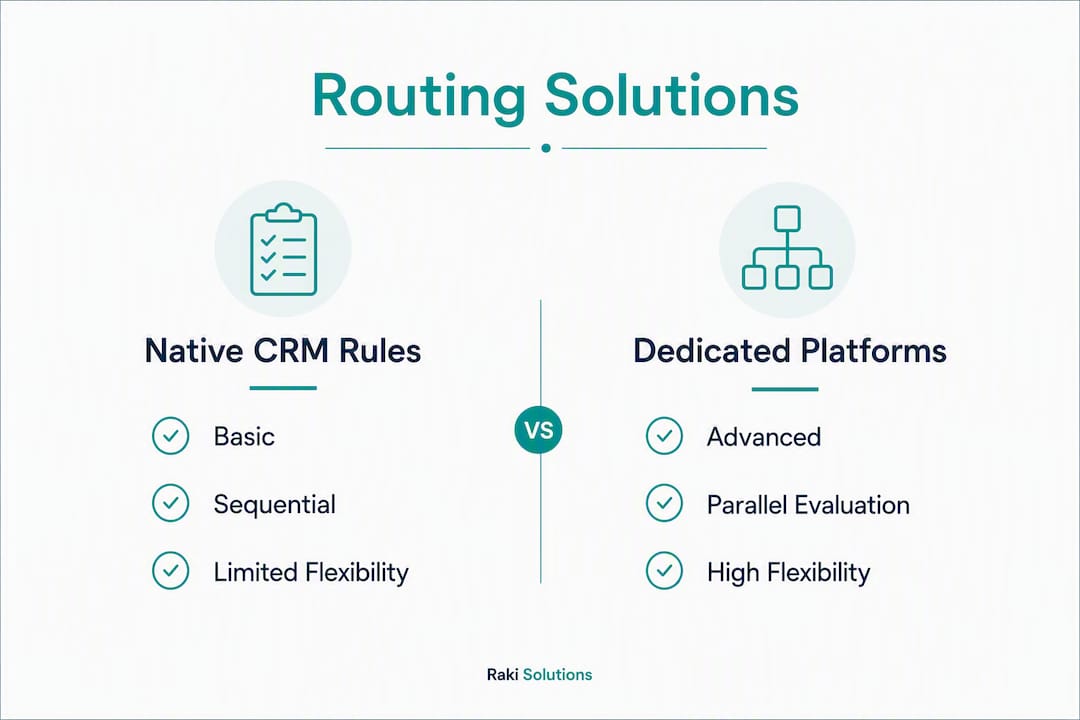
- Rule flexibility and explicit order control — Multi-condition rules that check related objects (account owner, deal stage, territory) and let you set exact evaluation order. Salesforce Flow supports branching and related-object lookups that native assignment rules can't match.
- Visual/no-code flow builder — FlowRouter's visual canvas lets ops managers and vendor managers update routing logic without filing a developer ticket. For outsourced SDR arrangements, this is critical because rules change faster than dev cycles allow.
- Lead-to-account matching — Routes a new lead to the existing account owner automatically, preserving relationship context.
- Audit logs and per-decision tracing — Platforms with per-decision logging make it fast to debug why a lead landed where it did, which materially reduces lead leakage.
- SLA enforcement and escalation alerts — Without active SLA monitoring, leads can sit in a rep's queue indefinitely if they're out of office.
Nice-to-have for most teams:
- Calendar and OOO sync, weighted round-robin, versioned rule changes, and territory-level capacity caps.
| Feature | Native Salesforce Rules | Salesforce Flow | Dedicated Platform (e.g., FlowRouter) |
|---|---|---|---|
| Rule flexibility and ordering control | Basic, sequential only | High, with branching | High, visual + logic |
| Visual/no-code interface | No | Partial | Yes |
| Capacity and territory management | No | Partial | Yes |
| CRM integration depth | Native | Native | API/native (HubSpot) |
| SLA monitoring and metrics | No | Custom build required | Yes, built-in |
| Security and audit logs | Limited | Custom build required | Yes, built-in |
| Implementation time | Hours | Days to weeks | Days |
| Pricing model | Included in Salesforce | Included in Salesforce | Per-seat or tiered |
How should you configure routing rules to avoid misroutes?

The single biggest configuration mistake is placing broad rule entries above narrow ones. Salesforce's assignment engine stops at the first match, so a rule that catches "all U.S. leads" placed above a rule for "enterprise U.S. leads in fintech" means your fintech enterprise leads never reach the right rep.
Follow this sequence:
- Document every routing scenario before touching the CRM. Map each lead type to its intended owner.
- Normalize key fields first — industry, company size, and geography must be clean before rules can match reliably.
- Order rules narrow to broad — most specific conditions at the top, catch-all triage queue at the bottom.
- Add a fallback queue — every routing setup needs a named owner for leads that match nothing.
- Test in sandbox with records that match every rule entry, including edge cases.
- Monitor the first 48 hours in production — pull live distribution reports and confirm each rule is firing as expected.
Pro Tip: Add a hidden "Routing Status" field to every lead record that logs which rule fired and when. It takes 20 minutes to set up and saves hours of debugging when a lead lands in the wrong queue.
How does routing change when you use an outsourced SDR team?
Outsourcing SDR execution doesn't simplify routing. It adds a layer of ownership complexity that most teams underestimate.
The core tension: your CRM has account owners (your AEs or CSMs), but your outsourced SDRs need to work leads without overwriting that ownership. Ownership-aware routing solves this by checking whether a lead maps to an existing account before assigning it to a vendor pool.
Here's a practical inbound routing workflow for an outsourced SDR program:
- Lead arrives and is enriched with company domain, size, and industry.
- System checks for an existing account match in the CRM.
- If matched: route to the account owner's queue with a notification to the vendor SDR to coordinate outreach.
- If unmatched: route directly to the vendor SDR queue with full lead metadata.
- SLA timer starts; vendor receives a task notification with qualification context.
- If no action within SLA window, escalate to ops manager.
For the handoff to work cleanly, every lead entering the vendor queue should carry:
- Account domain and matched account ID (if applicable)
- Lead source and campaign attribution
- Enrichment data (industry, company size, decision-maker title)
- SLA deadline timestamp
- Assigned channel sequence (email, LinkedIn, or phone)
What does a realistic implementation look like?
A well-run routing deployment takes four to six weeks. Rushing past the data normalization phase is where most teams create problems they spend months fixing.
Pre-deploy (Weeks 1–2):
- Audit existing lead fields for inconsistency (especially industry and territory values)
- Define account ownership rules and document all routing scenarios
- Set SLA targets per lead type and rep tier
- Agree on fallback queue ownership
Configuration (Weeks 2–4):
- Build rules or flows in sandbox, ordered narrow to broad
- Integrate calendar/OOO data if using a dedicated platform
- Set up audit log fields and routing-status trace
- Configure escalation alerts for SLA breaches
Testing and go-live (Weeks 4–6):
- Run sandbox tests with records matching every rule
- Conduct a 48-hour live monitor post-activation
- Prepare a rollback plan (export current rule set before go-live)
- Train ops team and vendor SDR managers on queue management
| Phase | Key Tasks | Owner | Timeline |
|---|---|---|---|
| Pre-deploy | Field audit, ownership rules, SLA definitions | RevOps | Weeks 1–2 |
| Configuration | Build rules, integrate calendar, set up logs | Admin/Ops | Weeks 2–4 |
| Testing | Sandbox verification, edge case testing | Admin | Weeks 4–6 |
| Go-live | 48-hour monitor, rollback plan ready | RevOps | Weeks 4–6 |
| Training | Vendor SDR onboarding, queue management | Ops Manager | Weeks 4–6 |
How do you compare the cost of software vs. outsourcing?
Routing software pricing follows three common shapes: per-seat (typically tied to CRM user count), per-lead or per-rule (usage-based, common in high-volume environments), and tiered/enterprise (flat annual fee with feature gates).
The hidden costs most teams miss:
- Implementation time — a dedicated platform can take 20–40 hours of admin time to configure correctly
- Ongoing maintenance — rule sets need updates every time territory or headcount changes
- Audit and debugging — without built-in logs, ops spends hours tracing misroutes manually
- Missed-opportunity cost — a lead that sits unworked for 24 hours past SLA has a materially lower conversion probability
Outsourced SDR pricing (fixed-fee monthly or per-qualified-meeting) bundles routing logic, SLA enforcement, and reporting into the engagement fee. The comparison that matters over 12 months isn't software license vs. SDR fee. It's: software + ops headcount + implementation + maintenance vs. outsourced SDR fee with routing included.
For smaller teams targeting new markets like APAC, the outsourced model often wins on total cost and time-to-first-meeting.
What security and compliance checks should U.S. teams run?
Before routing lead data to any third-party tool or vendor, verify these items:
Technical minimums:
- Data residency: confirm lead data stays within U.S. borders or your contractually required region
- Encryption in transit (TLS 1.2+) and at rest
- SSO and least-privilege access (vendor SDRs should see only their assigned leads)
Contract requirements:
- Data Processing Addendum (DPA) covering CCPA obligations
- Breach notification SLA (72 hours is a reasonable standard)
- Access revocation process for offboarding vendor staff
- Audit rights clause allowing you to review access logs on request
CRM permissions checklist:
- Never route to inactive or deprovisioned users
- Use named queues for triage, not individual user inboxes
- Log every ownership change with a timestamp and triggering rule
How do you decide between routing software and outsourcing?
Work through these five questions in order:
- Volume and complexity — Do you have 50+ reps or 200+ active routing rules? At that scale, native Salesforce rules become a maintenance liability and a dedicated platform pays for itself.
- Speed-to-lead target — If your SLA is under five minutes, you need automated routing with calendar awareness, not manual assignment.
- Account ownership importance — Running ABM or named-account motions? Ownership-aware routing is non-negotiable.
- Ops capacity — Do you have a RevOps admin who can maintain rule sets as your team scales? If not, outsourcing routing logic to a managed SDR partner removes that burden entirely.
- Budget and timeline — A dedicated platform takes four to six weeks to deploy correctly. An outsourced SDR program with built-in routing can be live in two weeks.
| Criteria | Weight | Native CRM Rules | Dedicated Platform | Outsourced SDR Program |
|---|---|---|---|---|
| Rule flexibility and ordering | High | Low | High | High (managed) |
| Visual/no-code interface | Medium | No | Yes | N/A |
| Capacity management | High | No | Yes | Yes |
| CRM integration depth | High | Native | API/native | Varies |
| SLA monitoring and metrics | High | No | Yes | Yes |
| Security and auditability | Medium | Limited | Yes | Contractual |
| Time to implement | Medium | Hours | Several weeks | A couple of weeks |
| Pricing model | High | Included | Per-seat/tiered | Per-meeting/fixed |
Practical threshold: Choose a dedicated routing platform when you have a larger sales team, complex ABM rules, or sufficient RevOps capacity to maintain it. Choose an outsourced SDR program when you're entering a new market, want predictable meeting volume, and don't want to build routing infrastructure from scratch.
Key Takeaways
The most important decision in any SDR routing setup is rule order: narrow rules must sit above broad ones, or your best leads get misrouted before the right rep ever sees them.
| Point | Details |
|---|---|
| Rule order is everything | Place narrow, specific rules above broad ones to prevent first-match short-circuiting in Salesforce. |
| 48-hour smoke test first | Before buying software, trace 200 recent leads to confirm whether you have a software or process gap. |
| Outsourced SDR programs need ownership-aware routing | Always check for an existing account match before sending a lead to a vendor SDR queue. |
| Scale threshold for dedicated platforms | Native Salesforce rules become a maintenance liability at 50+ entries; dedicated platforms or Flow are the next step. |
| Raki Solutions handles routing as part of SDR-as-a-Service | For teams entering APAC or ANZ, Raki Solutions manages ownership rules, SLA enforcement, and handoffs within the engagement. |
The routing mistake most SDR programs keep making
The conventional wisdom is that routing is a technical problem. Buy the right software, configure the rules, and leads flow to the right rep. That framing misses the real failure mode.
Most routing breakdowns aren't caused by bad software. They're caused by teams that never defined ownership clearly before they built the rules. A routing platform can only enforce decisions you've already made. If your account ownership data is stale, your territory definitions are ambiguous, or your vendor SDRs don't know which leads they're supposed to own, no amount of rule complexity fixes that.
The teams that get routing right spend more time on the pre-deploy phase than the configuration phase. They document every scenario, clean their field data, and agree on fallback ownership before a single rule is written. The 48-hour smoke test isn't a technical step. It's a forcing function that reveals the ownership gaps your team has been avoiding.
For outsourced SDR programs specifically, the handoff protocol matters more than the routing logic. A lead that arrives in the vendor queue with incomplete metadata, no SLA timestamp, and no channel assignment is a lead that will be worked inconsistently. The routing system is only as good as the data and agreements that feed it.
Raki Solutions removes the routing overhead for APAC and ANZ expansion
Building routing infrastructure for a new market is the kind of work that delays pipeline by weeks. Raki Solutions gives you a dedicated SDR team that arrives with ownership rules, SLA enforcement, and handoff protocols already built into the engagement.
Instead of spending four to six weeks configuring a routing platform, mapping territories, and training a vendor on your CRM setup, you get qualified meetings in APAC and ANZ within two weeks of kickoff. Raki Solutions handles target account research, decision-maker sourcing, multi-channel outreach, and pipeline infrastructure management as a single fixed-fee service. Weekly reporting gives you full visibility into meeting volume, lead disposition, and SLA performance without building a reporting layer yourself.
If your current routing setup is producing misroutes, stale queues, or inconsistent handoffs to your SDR team, the fastest fix is a routing audit. Book a pipeline audit with Raki Solutions to map your current ownership rules, identify leakage points, and get a deployment-ready plan for your APAC or ANZ expansion.
Useful sources and further reading
The sources below back the claims in this article and are worth reading directly for technical implementation details and vendor evaluation.
| Source | Best for |
|---|---|
| Salesforce Lead Assignment Rules: Configuration, Limitations, and What to Do When You Outgrow Them | Understanding rule ordering, scale thresholds, and when to move to Flow or a third-party platform |
| FlowRouter — Visual Lead Routing for HubSpot | Evaluating no-code routing UIs and HubSpot-native feature sets |
| Fast, fair, and auditable routing — Default | Audit logs, ownership-aware assignment, and per-decision tracing capabilities |
| Lead Routing: Salesforce Rules and Flow — SalesforceTutorial | Layered architecture for production routing setups |
| How to: Lead Assignment Rule — Salesforce Dictionary | Step-by-step sandbox testing and 48-hour monitoring best practices |
For technical implementation in Salesforce, start with the GTM Advisor Group's breakdown of assignment rule limitations. For vendor selection and no-code UI evaluation, FlowRouter's documentation and Default's product page give the clearest picture of what dedicated platforms add over native CRM rules.